After You Send Files to an Outsourced Vendor, Can You Still Revoke Access?
Written in 2026/11/15In autumn 2026, Taiwan saw three incidents in a row, and every breach was “outside the company”. 91APP disclosed between October and November that its order database had been illegally accessed, affecting about 4.8 million consumers; SinoPac Bank's abnormal transfers pointed initially at a new-system vendor's security settings; MOS Burger's personal-data leak came from an outsourced vendor's platform. In its 5 November autumn-incident analysis, security outlet CyberQ listed “outsourcing” as one of six major breach sources, citing Microsoft's 2026 Digital Defense Report: Taiwan is the world's 4th most affected by cyber threats. What these incidents share isn't just that vendors were attacked — it's that clients' and principals' files were already in the vendors' hands. We've covered the risk of files kept inside the company in Japanese security incidents keep mounting: is it really safe to keep company files in the office?; this post covers the other half — once files leave the company and reach an outsourced vendor, what control do you have left?
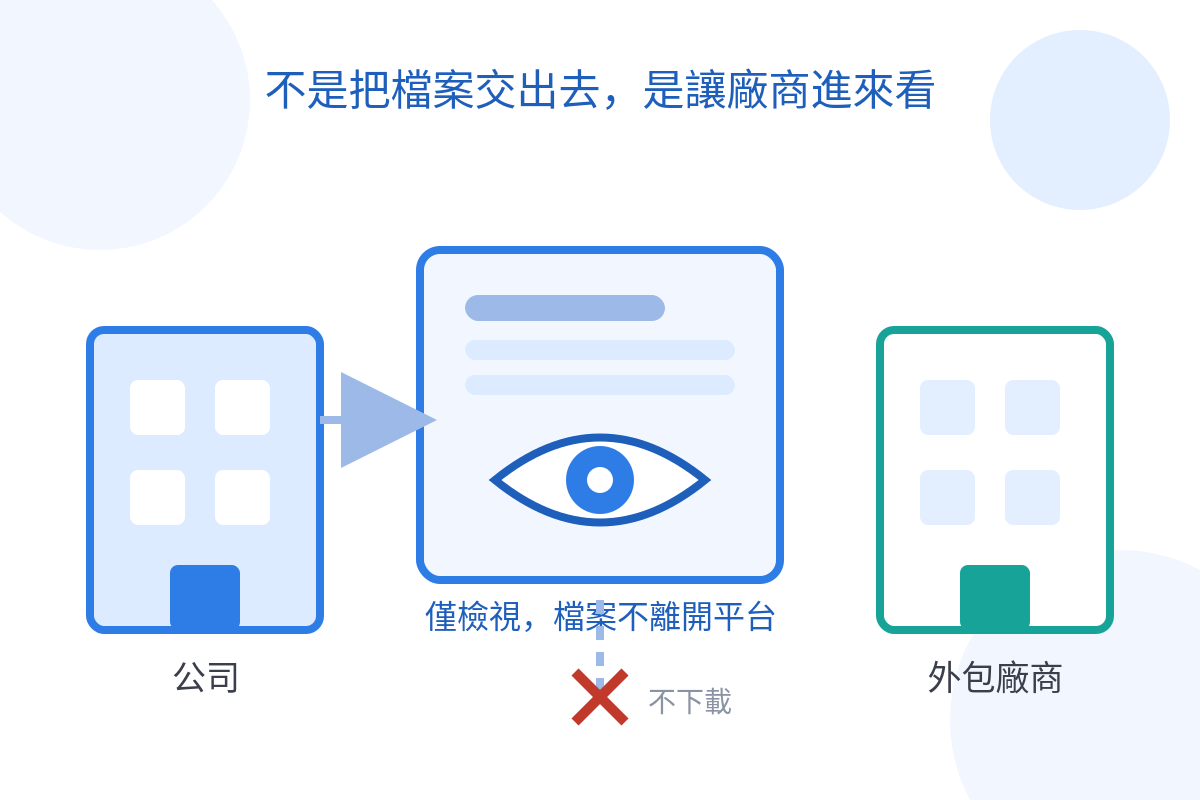
1. Once a file is "sent out," control goes with it. The most common ways to hand files to vendors are email attachments, USB drives, or vendor-provided cloud links. They share one trait: the file itself leaves your system. From that moment, copies sit on the vendor's computers, mailboxes and backups — invisible to you and impossible to delete. When the engagement ends the contract says "return or destroy the data", but you have no way to verify it: vendor staff leave, computers go in for repair, platforms get breached — your files are in all of them. The problem is not whether the vendor is reliable; it is that the delivery method itself never gives you a way to take access back. Changing this starts with a change of mindset: do not send files out — let the vendor come in to view them.
2. Change delivery to view-only first: the vendor sees the content but keeps no copy. CloudFiles sharing can be set to view-only: the vendor logs in with their own account and views specs, artwork and quotes in the browser, while the file itself stays on the platform and produces no scattered download copies. Files travel over encrypted connections and are encrypted at rest — we covered that in What is SSL encryption? 256-bit, TLS and AES explained in one read. Of course, view-only can't stop someone photographing the screen with a phone — this post doesn't oversell it. What it really removes is the most common, least managed risk of all: one file copied into ten copies on the vendor's side, sitting there for years, forgotten by everyone.
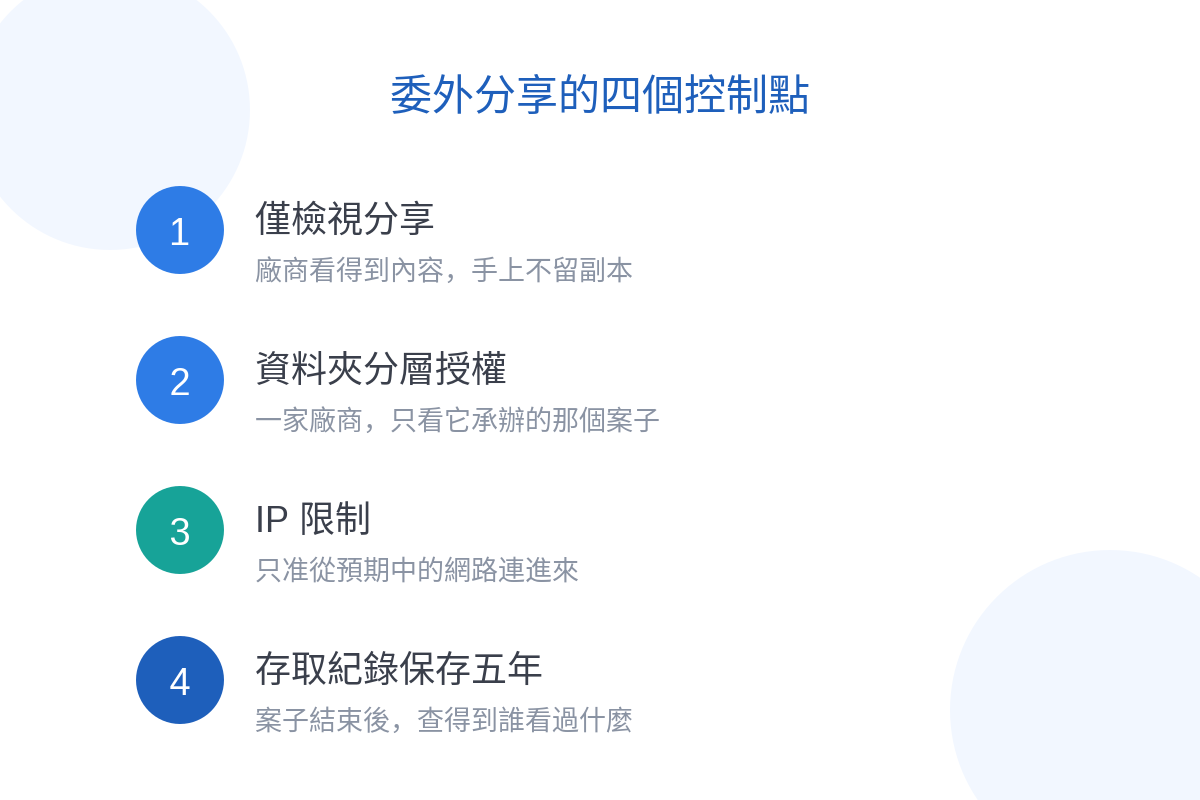
3. Slice permissions by folder: one vendor sees only its own project. The most common real-world mistake is, for convenience, giving vendor accounts visibility of every company folder. The right way is the reverse: one project, one folder, and folder permissions granted only to the vendor handling it — for the company's finance, HR and other clients' data, the vendor cannot even see that the folder exists. When a project changes hands, only that folder's authorisation list changes, affecting no one else. When choosing business cloud storage, ask this one question first: can permissions be cut down to the folder level? If not, external sharing will sooner or later become company-wide open.
4. Then control the source: vendors should connect from "expected places". Once accounts and folder permissions are granted, add one more layer — IP restrictions: converge allowed login sources to the company's and the vendor's office networks, so even if credentials leak, a login from an unknown network is blocked first. The nightmare in outsourcing is credentials leaking on the vendor side and an attacker logging in from anywhere in the world; IP restriction turns login sources into something listable and auditable. For SMBs this is the cheapest first line of defence: no new hardware — just make sure the doorplate is right.
5. The day the engagement ends is the real test of external sharing. When a project closes or vendors change, do two things. First, disable vendor accounts and remove them from folder authorisation lists — CloudFiles is billed annually with unlimited users, so vendor accounts cost nothing extra and there is no "might need it later" excuse; revoke cleanly. Second, keep the records: CloudFiles access logs are retained for five years, so who viewed which file and when can always be traced afterwards. If a data leak surfaces later, you can answer whether it actually left from our side and what the vendor viewed during the engagement — instead of guessing. These records are your last control once a file has left the building.
Back to the opening question: after files are sent to an outsourced vendor, whether you can take the permissions back depends on how you sent them. Sent by attachment or USB drive, they're gone; kept on a platform, with the vendor coming in to view, they can be taken back any time. CloudFiles offers a free one-month trial — flat annual fee from NT$3,000, unlimited users: during the trial, take one live outsourcing case, switch its delivery to view-only, set permissions by folder, turn on IP restrictions, and when the case closes, walk through reclaiming permissions and checking the logs yourself before deciding whether to move all vendor delivery to this model.